Your Business Needs an AI Policy — Even If You Only Use ChatGPT
Artificial intelligence is no longer only a technology project.
Employees use AI to write emails. They use it to summarize documents. They use it to analyze information, prepare presentations, create marketing content, write code, and answer customer questions.
In many businesses, this use started without a formal decision.
An employee opened ChatGPT or another AI tool and started using it.
This creates a simple problem.
Your business can have AI risk even when it does not have an AI project.
You do not need a large AI governance programme to manage this risk. However, you need clear rules.
This is where an internal AI policy becomes important.
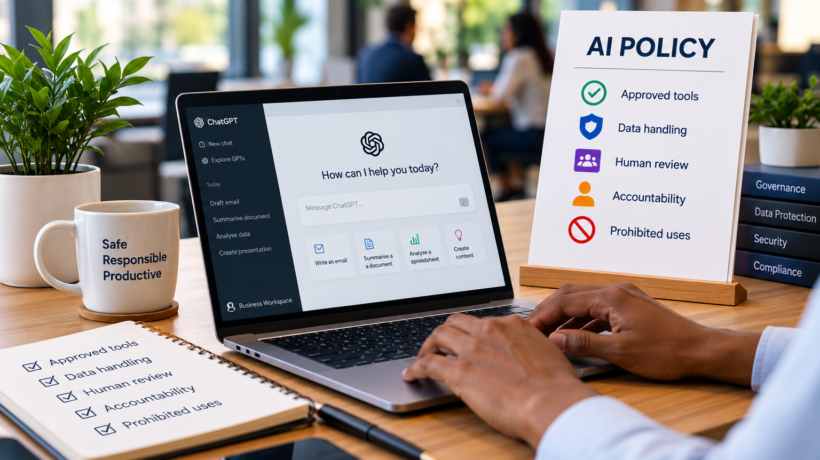
An AI policy tells employees:
- which AI tools they can use;
- what information they can enter into those tools;
- when a person must review AI output;
- who is responsible for decisions made with AI;
- which uses are not permitted; and
- what employees must do when something goes wrong.
The objective is not to stop employees from using AI.
The objective is to make AI use safe, controlled, useful, and accountable.
Why Small Businesses Need an AI Policy
Many small businesses think AI governance is only necessary for large organizations.
This is not correct.
Consider a small company with ten employees.
One employee uses an AI assistant to rewrite a customer email.
Another uploads a spreadsheet to analyze sales performance.
Another uses AI to summarize a supplier contract.
Another creates marketing content.
Another asks an AI coding assistant to modify the company website.
The company is already using AI in several business processes.
The owner might not know this.
This is sometimes called shadow AI. Employees use AI tools without formal approval or oversight.
The risk does not depend only on the size of the company.
The risk depends on:
what information goes into the AI system, what the AI system produces, and what the business does with that output.
A simple AI policy gives employees clear boundaries.
1. Define the Purpose of Your AI Policy
Start with a simple statement.
Explain why the policy exists.
For example:
The purpose of this policy is to help employees use artificial intelligence safely and responsibly while protecting company, customer, employee, and confidential information.
Do not make the policy unnecessarily complicated.
Employees must be able to understand it.
They must also be able to apply it during normal work.
A policy that nobody understands will not control AI use.
2. Define Which AI Tools Employees Can Use
Your AI policy should contain an approved AI tools list.
Do not allow employees to choose any AI service they find online.
Different AI services have different terms, security controls, data practices, and administration features.
Your business can define categories such as:
Approved
Employees can use the tool for approved business activities.
Approved with restrictions
Employees can use the tool, but they cannot enter confidential or personal information.
Not approved
Employees must not use the tool for company work.
Your approved list could include tools for:
- general AI assistance;
- document creation;
- coding;
- meeting transcription;
- image generation;
- customer support;
- data analysis; and
- automation.
Assign a person to maintain the list.
For a small business, this could be the owner, operations manager, IT manager, or another nominated employee.
The rule should be simple:
If a tool is not approved, do not use it for company work.
3. Control What Data Employees Can Give to AI
Data handling should be one of the most important parts of the policy.
Employees can easily copy information into an AI prompt.
That information can include:
- customer details;
- employee information;
- financial information;
- contracts;
- passwords;
- API keys;
- source code;
- business plans;
- intellectual property; and
- confidential communications.
Employees need clear instructions about what they can and cannot enter.
A useful approach is to divide information into categories.
Public information
Employees can normally use information that the company has already made public.
Examples include published website content and public product information.
Internal information
Employees can use internal information only when the approved AI tool and the business policy permit it.
Confidential information
Employees must not enter confidential information unless the business has specifically approved the tool and the use case.
Personal or sensitive information
Apply stronger controls to personal information.
Do not assume that an AI tool is an acceptable place to process personal information because the tool is popular.
Employees must follow the company’s privacy, security, and data protection requirements.
A useful default rule is:
If you would not send the information to an unknown third party, do not paste it into an unapproved AI tool.
4. Never Put Passwords or Security Credentials Into AI Prompts
Some information needs an explicit prohibition.
Employees must not enter authentication or security credentials into general AI prompts.
This includes:
- passwords;
- private keys;
- API secrets;
- access tokens;
- database credentials;
- recovery codes; and
- other authentication information.
AI can help an employee understand how to configure a system.
It does not need the employee’s live password or production secret to do this.
Use placeholders instead.
For example:
API_KEY=YOUR_API_KEY
Do not paste the real credential.
5. Require Human Review of AI Output
AI output can look correct when it is wrong.
This is one of the most important concepts for employees to understand.
Good writing is not proof of accuracy.
AI can produce:
- incorrect facts;
- incorrect calculations;
- invented references;
- incomplete answers;
- unsuitable recommendations;
- insecure code; and
- misleading summaries.
Your policy should therefore define when human review is required.
A useful general rule is:
AI can assist with work. A person remains responsible for the final work.
The level of review should depend on the risk.
A draft internal email can require a simple review.
Financial information requires more careful checking.
Legal, regulatory, employment, safety, security, or customer-impacting decisions can require specialist review.
Do not use the same review standard for every task.
Use stronger controls when the possible impact is higher.
6. Define Who Is Accountable
AI must not become a way to avoid responsibility.
An employee should not be able to say:
“ChatGPT told me to do it.”
The person who uses the AI output remains responsible for checking it and using it correctly.
Managers remain responsible for the business processes they control.
The organization remains responsible for the systems and controls that it puts in place.
Your policy should make this clear.
For example:
AI can support a decision. AI does not own the decision.
This distinction becomes particularly important when AI affects customers, employees, finances, contracts, security, or regulatory obligations.
7. Define Prohibited AI Uses
An AI policy should clearly state what employees must not do.
Do not depend only on general statements such as “use AI responsibly.”
Give examples.
Your prohibited-use section can state that employees must not use AI to:
- disclose company secrets without approval;
- expose passwords or security credentials;
- impersonate another person deceptively;
- create deliberately false business records;
- bypass company security controls;
- make unauthorized commitments to customers;
- automatically send important external communications without the required review;
- make final employment decisions without the required human process;
- make regulated or high-impact decisions without appropriate oversight; or
- process information in a way that breaches company privacy or security requirements.
The exact restrictions will depend on your business.
A recruitment company will have different risks from a restaurant.
An accounting practice will have different risks from a design agency.
Build the policy around the work that your business actually performs.
8. Define Rules for AI-Generated Content
AI can create text, images, audio, video, presentations, software code, and other material.
Employees need to know when they can use this content.
Your policy should answer questions such as:
Can AI-generated marketing copy be published without review?
Can an AI-generated image be used commercially?
Can developers insert AI-generated code into production systems?
Can AI draft customer contracts?
Does AI-generated customer communication need approval?
When must the company disclose that AI was used?
Do not leave these decisions to individual employees if the use can create significant business risk.
Define the rule before the problem occurs.
9. Apply More Control to High-Risk AI Uses
Not all AI uses have the same risk.
Using AI to brainstorm ten names for a newsletter is different from using AI to decide whether somebody gets a job.
Your policy can classify AI activities by risk.
Low risk
Examples include:
- brainstorming;
- formatting text;
- creating meeting agendas;
- rewriting non-confidential content; and
- generating ideas.
Normal employee review can be sufficient.
Medium risk
Examples include:
- customer communications;
- business analysis;
- internal reports;
- code generation; and
- analysis of company information.
These uses can require approved tools and documented human review.
High risk
Examples can include AI that materially affects:
- employment;
- financial decisions;
- legal matters;
- regulatory reporting;
- health or safety;
- access to important services; or
- significant customer outcomes.
These uses need stronger approval, specialist review, and documented controls.
Some uses might not be appropriate for AI at all.
10. Tell Employees What to Do When AI Gets Something Wrong
Mistakes will happen.
Your policy needs an escalation process.
Employees should know what to do if:
- confidential information is entered into the wrong AI tool;
- AI produces harmful or discriminatory content;
- incorrect AI information reaches a customer;
- AI-generated code creates a security problem;
- an automated AI process behaves unexpectedly; or
- an employee discovers an unapproved AI tool in use.
Keep the reporting process simple.
For example:
Stop → Record → Report → Review
Stop the affected activity where appropriate.
Record what happened.
Report the incident to the nominated person.
Review the impact and decide what action is necessary.
Do not create a reporting process that discourages employees from reporting mistakes.
Early reporting can reduce the impact of an incident.
11. Keep a Simple AI Register
You do not necessarily need expensive AI governance software.
A spreadsheet can be enough for a small business.
Maintain an AI register that records important AI uses.
Useful fields include:
| Field | Example |
|---|---|
| AI tool | Approved AI assistant |
| Business use | Marketing content |
| Owner | Marketing Manager |
| Data used | Public website information |
| Risk level | Low |
| Human review | Required before publication |
| Approval status | Approved |
| Review date | Annual review |
Start with the important use cases.
Do not create unnecessary administration.
The purpose of the register is visibility.
You should know where AI is being used, why it is being used, and who is responsible for it.
12. Train Employees on the AI Policy
Publishing a policy is not enough.
Employees need to understand it.
Training does not have to be complicated.
Explain:
- which tools are approved;
- which data they must not enter;
- how to check AI output;
- which uses need approval;
- which uses are prohibited; and
- how to report an AI incident.
Use practical examples.
For example:
Allowed: Ask an approved AI tool to rewrite public marketing copy.
Not allowed: Upload a customer database to an unapproved AI tool.
Allowed: Use AI to create a first draft of a report.
Not allowed: Send the report without checking the facts.
Simple examples make the policy easier to apply.
13. Review the Policy Regularly
AI technology changes quickly.
Your business will also find new uses for it.
Do not write the policy once and forget it.
Set a review schedule.
Also review the policy when:
- the company adopts a significant new AI tool;
- an AI incident occurs;
- the business starts a new high-risk AI use;
- relevant legal or regulatory requirements change; or
- the company’s data or security requirements change.
The policy should develop with your AI use.
A Simple AI Policy Framework for Small Businesses
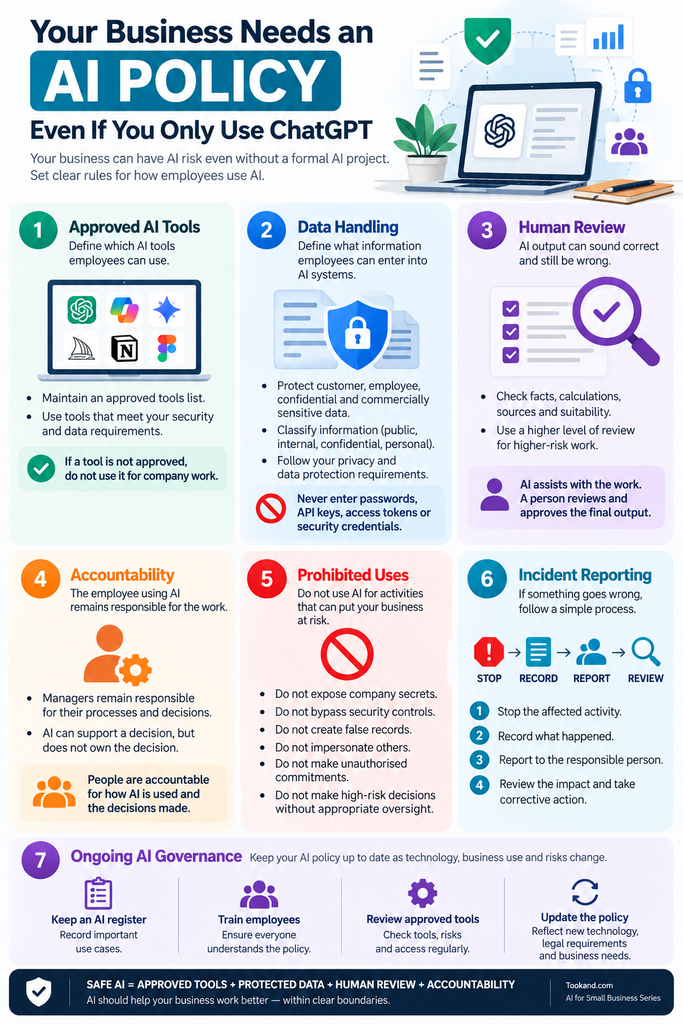
You can start with seven control areas:
1. Approved tools
Which AI systems can employees use?
2. Data handling
What information can employees give to those systems?
3. Human review
Who must check the output?
4. Accountability
Who remains responsible for the work or decision?
5. Prohibited uses
What must employees never do with AI?
6. Incident reporting
What happens when something goes wrong?
7. Governance
Who maintains the policy, approved tools list, and AI register?
This does not need to become a 50-page governance manual.
For many small businesses, the first AI policy can be short.
The important requirement is clarity.
The AI Policy Should Enable AI, Not Block It
There is a risk at both extremes.
A company can allow employees to use any AI tool without controls.
That creates unnecessary exposure.
A company can also prohibit almost every AI use.
Employees can then continue using AI without telling management.
Neither approach is effective.
A better approach is controlled adoption.
Give employees approved tools.
Define the boundaries.
Protect important information.
Require human review where necessary.
Increase controls when the risk increases.
Then allow employees to use AI productively inside those boundaries.
This changes the conversation from:
“Can we use AI?”
to:
“How can we use AI safely for this task?”
Start Before Your AI Use Becomes Complicated
Your business does not need an AI department before it needs an AI policy.
If an employee uses ChatGPT, an AI meeting assistant, an AI coding tool, or an AI writing tool for business work, AI is already part of your operating environment.
Start with a simple policy.
Approve the tools.
Protect the data.
Require human review.
Define accountability.
Prohibit unacceptable uses.
Record important AI use cases.
Then improve the controls as your use of AI grows.
The objective is not to eliminate AI risk.
The objective is to understand it, control it, and use AI in a way that supports the business.
If your business uses AI, your business needs rules for AI.
Start with the Right AI Foundation
An AI Policy is one part of responsible AI adoption. Before choosing tools or introducing more AI into your business, start with the business problem and define what you want AI to improve. In the first article in this series, “AI Adoption for Small Businesses: Where Do You Actually Start?”, we explain a practical path from business problem → use case → tool → pilot → controls → measurement → scale.
Read next: AI Adoption for Small Businesses: Where Do You Actually Start?